

Instructions — Pocket Piano V2ven
Everythingyou need to know.
From unboxing to stage-ready in under 60 seconds. Assembly, controls, sounds, connectivity and more.
Piano assembly. First setup.
Everything you need to get started. The Pocket Piano V2ven rolls up and deploys in under 60 seconds.
Unroll the keyboard
Remove the Pocket Piano from its case. Lay the rolled keyboard on a flat surface and gently unroll it completely.
Connect the modules
Connect the main module to the keyboard using the magnetic connector. You will hear a click when it is correctly connected.
Power on
Slide the power button (1) to the right to turn on the piano. The LED will light up to confirm it is powered on.
Battery life: up to 8 hoursConnect via Bluetooth
Connect the main module to your mobile or tablet. Use the app that best suits you to play the piano (Walk band, N-Track Studio).
Regulate volume
Hold button 5 to increase volume to maximum. Hold button 6 to decrease volume to minimum.
Turn off the piano
Slide button 1 to power off. Always turn off the piano after use to preserve battery life.
Basic functions. Button map.
Every button has a purpose. Here’s a full reference of all 13 physical controls on the main module.
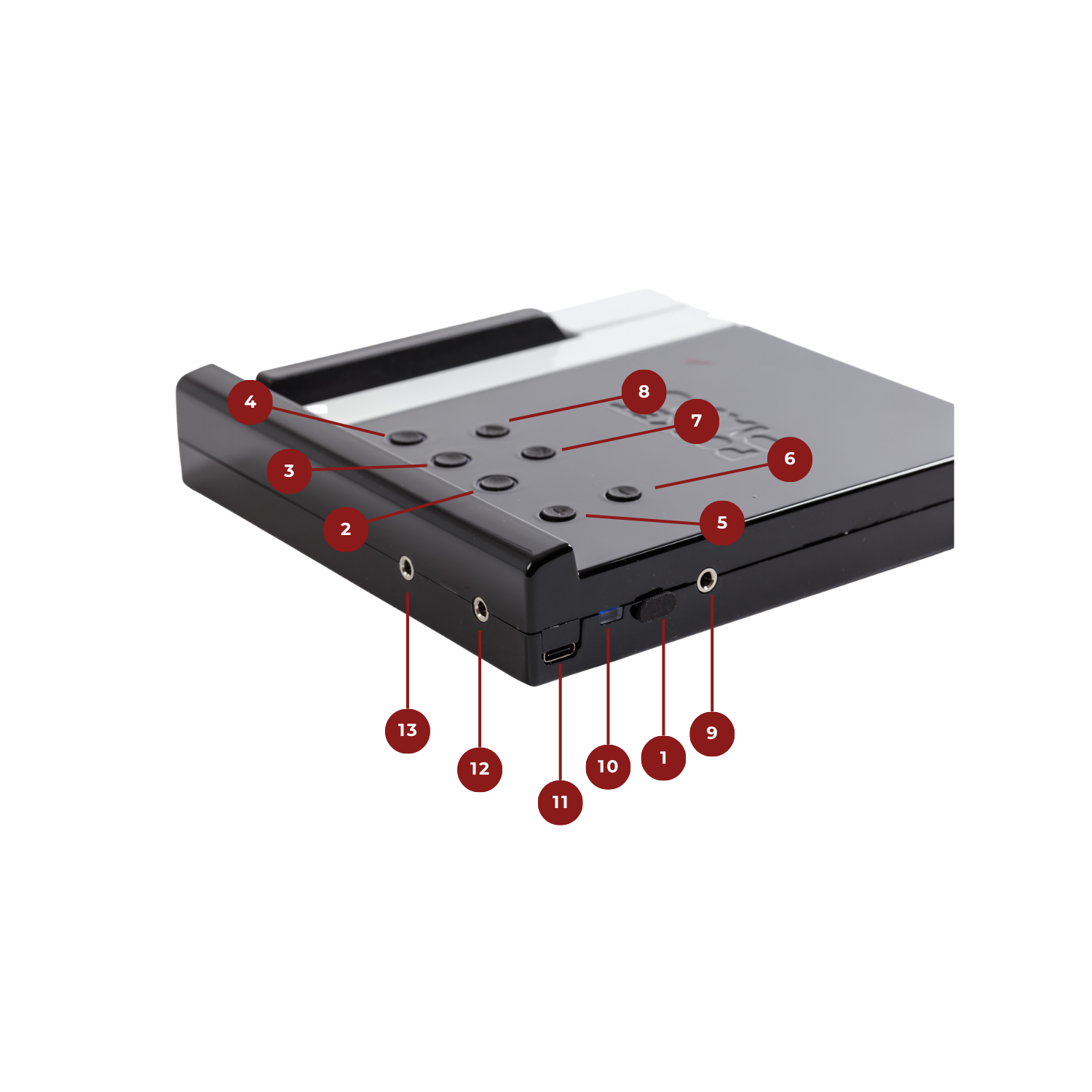
On / Off
Power switch. Slide to turn the main module on or off.
Main instrument selection
Selects the primary instrument sound for the keyboard.
Secondary instrument selection
Layers a secondary instrument on top of the main one.
Effect on the instrument
Applies an effect to the currently selected instrument.
Increase volume
Raises the output volume of the main module.
Decrease volume
Lowers the output volume of the main module.
Left octave transposition
Shifts the left section of the keyboard one octave at a time.
Right octave transposition
Shifts the right section of the keyboard one octave at a time.
Headphones & speaker
3.5mm output for headphones or external speaker.
Charging LED
Indicates charging status while the module is plugged in.
USB-C charging connector
Connect a USB-C cable to charge the internal battery.
Pedal connector (jack)
3.5mm input for a standard sustain pedal.
MIDI connector (jack)
3.5mm MIDI output to connect external MIDI gear.
6 sounds. Infinite expression.
The Pocket Piano V2ven ships with six professionally sampled instruments, each precisely mapped to all 87 keys.
Steinway Ivory II D
Sampled from a Steinway Model D — the same concert grand used at Carnegie Hall. Pure, warm, unforgettable.
Electric Piano
Classic Rhodes-style electric piano. Perfect for jazz, soul and pop with that iconic warm bell tone.
Pipe Organ
Full cathedral pipe organ. Rich harmonic overtones ideal for classical pieces and ambient compositions.
Strings
Lush orchestral string section. Great for pads, melodies and cinematic arrangements.
Vibraphone
Percussive mallet instrument with a bright, crystalline tone. A favorite for jazz and minimalist pieces.
Harpsichord
Baroque keyboard instrument with a sharp, plucked tone. Perfect for classical and early music repertoire.
LED reference. What they tell you.
The main module uses a multi-color LED system to communicate status, mode and battery level at a glance.
Octave reference
Active sound
More sounds
Audio level
Pad selection
More pads
Final pads
Sustain pedal
Sustain pedal. Full expression.
The Pocket Piano V2ven is compatible with any standard sustain pedal via the 3.5mm jack input on the main module.
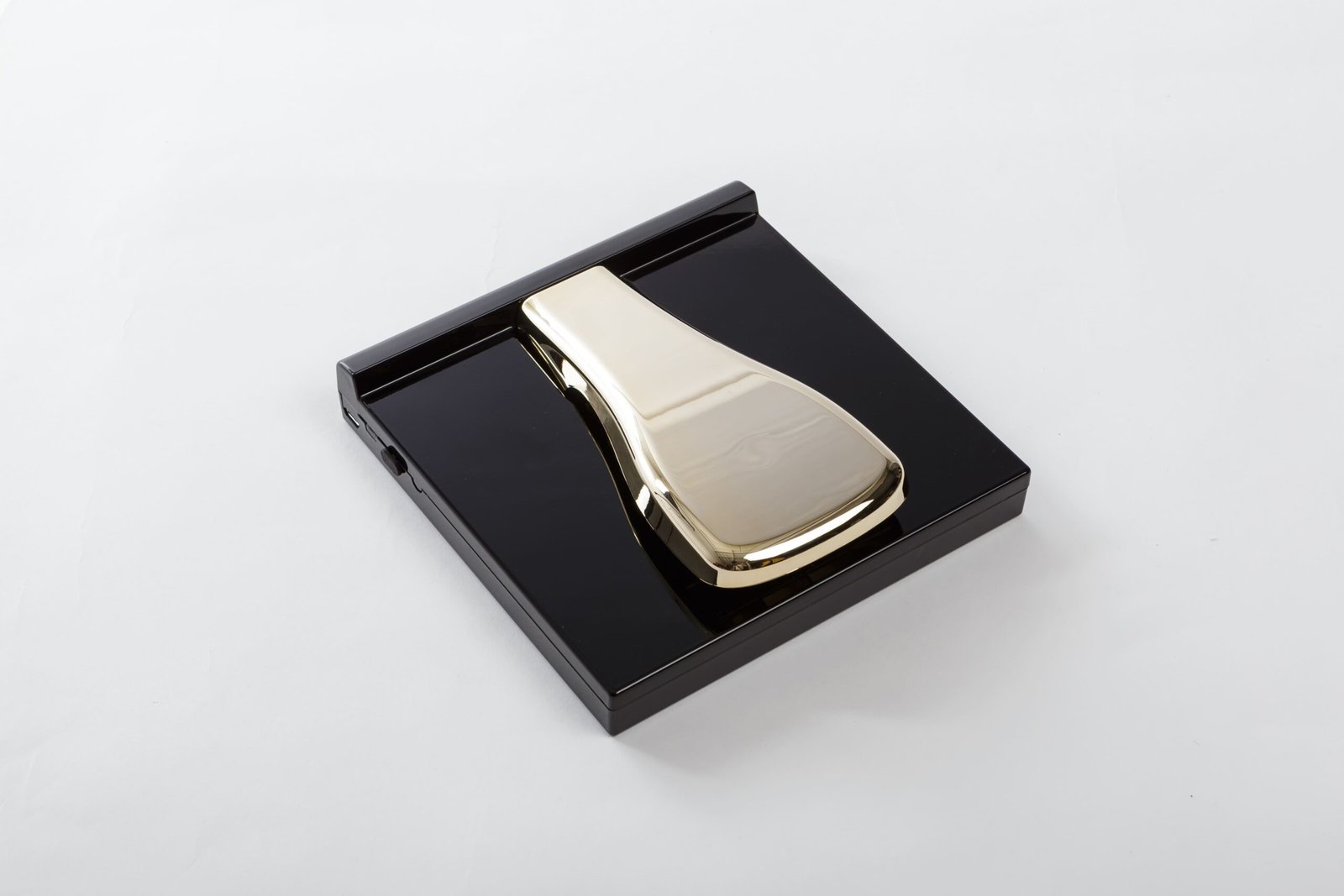
3.5mm TRS Jack
Plug any standard sustain pedal into the 3.5mm input on the left side of the main module.
Auto-detect polarity
The module automatically detects pedal polarity on startup. Do not hold the pedal down when powering on.
Not supported
The V2ven supports on/off sustain only. Half-pedaling is not available in this firmware version.
Button 7 as pedal
If no pedal is connected, use button 7 on the main module as a sustain hold button.
Full specs. Every detail.
Technical reference for the Pocket Piano V2ven main module and keyboard assembly.