

Instructions — Pocket Piano V2ven
Everythingyou need to know.
From unboxing to stage-ready in under 60 seconds. Assembly, controls, sounds, connectivity and more.
Piano assembly. First setup.
Everything you need to get started. The Pocket Piano V2ven connects magnetically and is stage-ready in under 60 seconds.
Connect the octaves
Remove the octave modules from the carry case. Connect them magnetically in any order — except the main module, which must always be placed in the leftmost position.
Assemble the keyboard
Snap the octave modules together using the magnetic connectors. The main module must be placed at the far left. Use only the octaves you need — from a compact setup to full 87-key range.
Power on
Slide the power button (1) to the right to turn on the piano. The LED will light up to confirm it is powered on.
Battery life: up to 8 hoursConnect via Bluetooth
Connect the main module to your mobile or tablet. Use the app that best suits you to play the piano (Walk band, N-Track Studio).
Regulate volume
Hold button 5 to increase volume to maximum. Hold button 6 to decrease volume to minimum.
Turn off the piano
Slide button 1 to power off. Always turn off the piano after use to preserve battery life.
Basic functions. Button map.
Every button has a purpose. Here’s a full reference of all 13 physical controls on the main module.
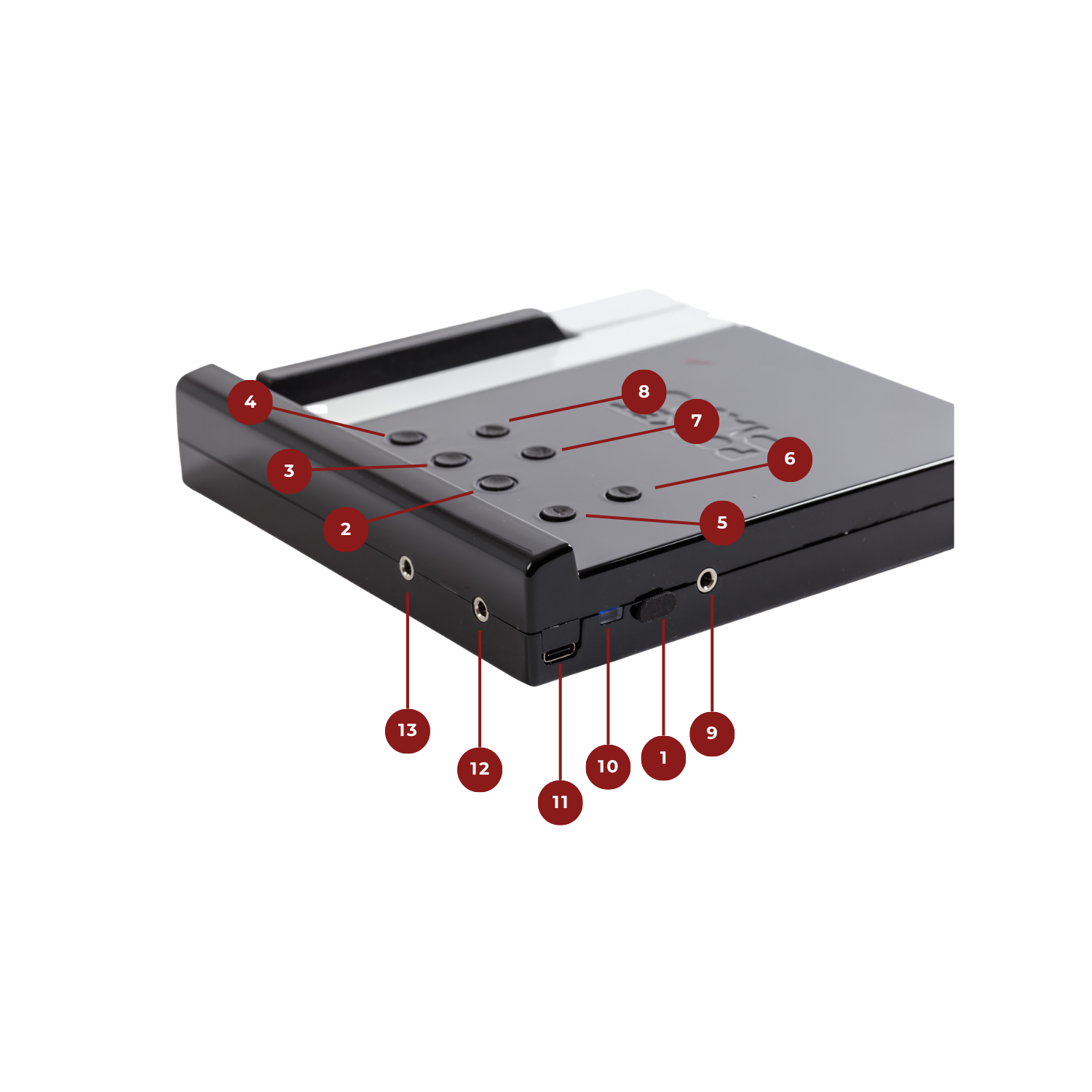
On / Off
Power switch. Slide to turn the main module on or off.
Main instrument selection
Selects the primary instrument sound for the keyboard.
Secondary instrument selection
Layers a secondary instrument on top of the main one.
Effect on the instrument
Applies an effect to the currently selected instrument.
Increase volume
Raises the output volume of the main module.
Decrease volume
Lowers the output volume of the main module.
Left octave transposition
Shifts the left section of the keyboard one octave at a time.
Right octave transposition
Shifts the right section of the keyboard one octave at a time.
Headphones & speaker
3.5mm output for headphones or external speaker.
Charging LED
Indicates charging status while the module is plugged in.
USB-C charging connector
Connect a USB-C cable to charge the internal battery.
Pedal connector (jack)
3.5mm input for a standard sustain pedal.
MIDI connector (jack)
3.5mm MIDI output to connect external MIDI gear.
8 sounds. Infinite expression.
The Pocket Piano V2ven ships with eight professionally sampled instruments, each precisely mapped to all 87 keys.
Ivory-1
Powered by Synthogy Ivory II, featuring the expressive character of a sampled Steinway D concert grand. Pure, warm, unforgettable.
Ivory-2 Mellow
A softer, warmer grand piano voice. Ideal for ballads, slow pieces and intimate performances.
Ivory-3-2 Bright
A brighter, more articulate grand piano tone. Perfect for cutting through a mix or adding brilliance to your performance.
Time Electric Piano
Classic tine-style electric piano. Perfect for jazz, soul and pop with that iconic warm bell tone.
FM Electric Piano
FM-synthesized electric piano with a bright, punchy character. Great for funk, R&B and modern productions.
Harpsichord
Baroque keyboard instrument with a sharp, plucked tone. Perfect for classical and early music repertoire.
Draw Bar Organ
Classic drawbar organ tones with rich harmonic overtones. Great for gospel, jazz and rock performances.
Vibraphone
Percussive mallet instrument with a bright, crystalline tone. A favorite for jazz and minimalist pieces.
LED reference. What they tell you.
The main module uses a multi-color LED system to communicate status, mode and battery level at a glance.
Octave reference
Active sound
More sounds
Audio level
Pad selection
More pads
Final pads
Sustain pedal
Sustain pedal. Full expression.
The Pocket Piano V2ven is compatible with the PocketPiano sustain pedal. The pedal connects wirelessly via automatic pairing and also supports wired connection for initial setup.
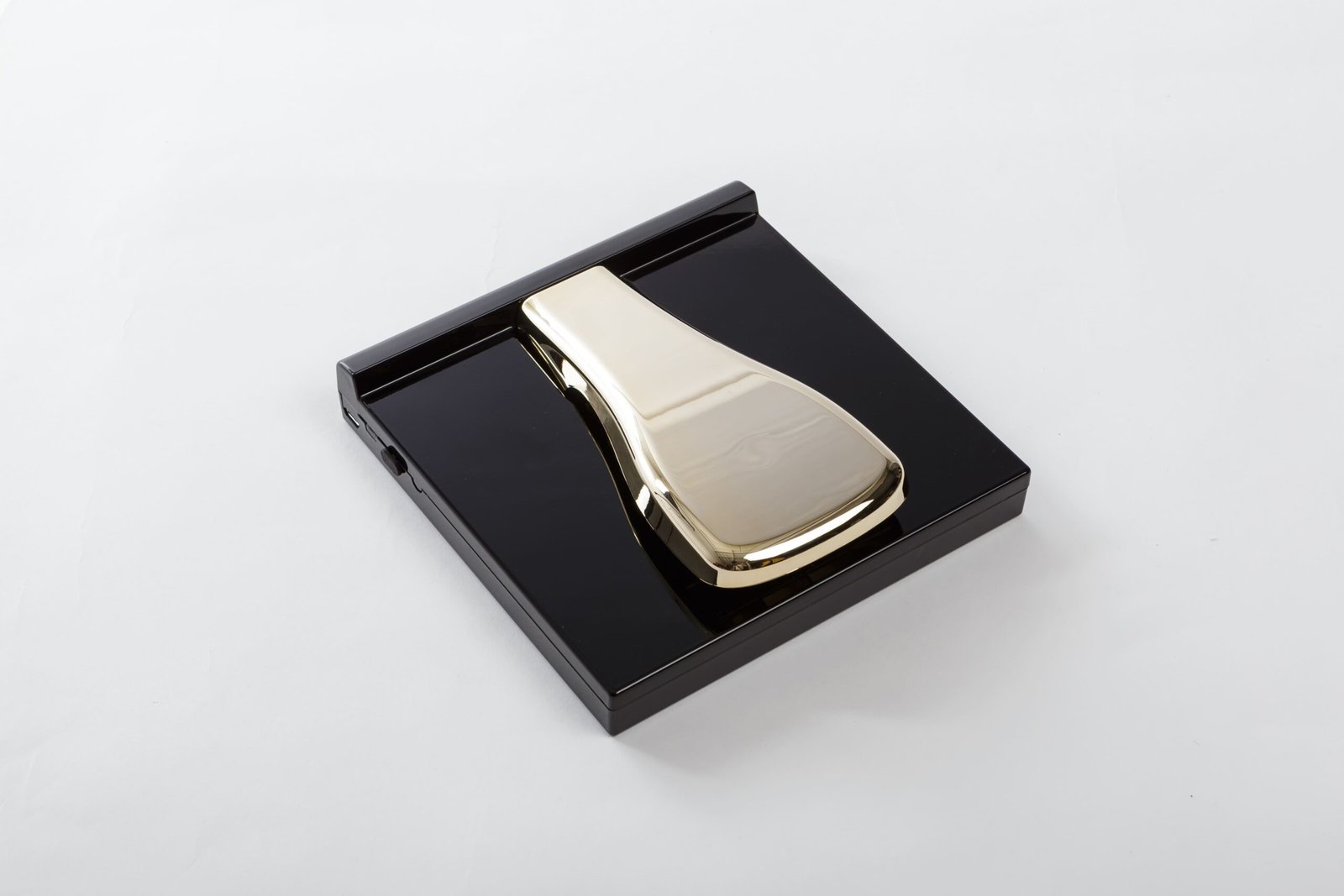
Wireless pairing
The PocketPiano pedal connects wirelessly with automatic pairing. For initial pairing: with both devices off, connect the cable between the MZ and pedal, power on the MZ, then power on the pedal. Wait for the center LED to flash twice in blue, then power off both devices, disconnect the cable — the pedal is now paired.
Auto-detect polarity
The module automatically detects pedal polarity on startup. Do not hold the pedal down when powering on.
Not supported
The V2ven supports on/off sustain only. Half-pedaling is not available in this firmware version.
Full specs. Every detail.
Technical reference for the Pocket Piano V2ven main module and keyboard assembly.